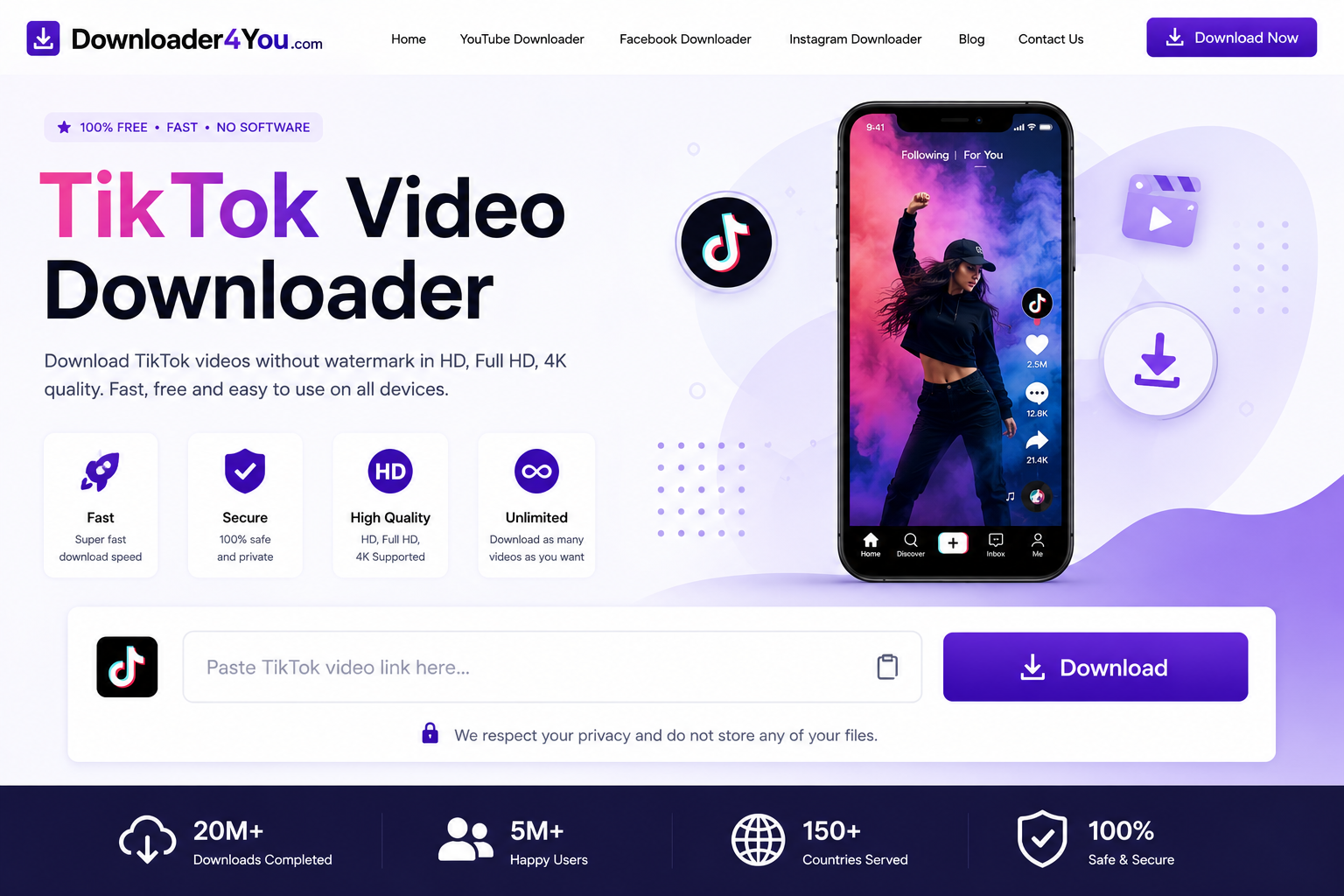
The TikTok Video Downloader from Downloader4You lets you process supported TikTok video links directly from your web browser. Copy a TikTok URL, paste it into the downloader and check the available options for saving an authorized video to your device.
Downloader4You is designed for a simple experience on computers, smartphones and tablets. You can use the service from a compatible browser without needing to install specialized desktop software.
Whether you are looking for a TikTok Downloader Online, TikTok Downloader MP4, TikTok Downloader HD, TikTok Downloader 4K, or a convenient way to process a TikTok video link, Downloader4You provides a straightforward URL-based workflow.
Important: Only download videos that you own, have permission to download, or are otherwise legally authorized to save. A downloaded file does not transfer copyright ownership or give you permission to redistribute someone else’s content.
TikTok Downloader Online
A TikTok Downloader Online can be useful when you already have the URL of a particular TikTok video and want to process it through your browser.
The basic process is simple:
Copy the TikTok link → Paste the link → Process the URL → Select an available option → Save
Because Downloader4You works through a browser, you can use it from different operating systems and devices.
It can be convenient for users who do not want to install another application simply to process a supported video URL.
For the official TikTok platform, visit TikTok.
Free TikTok Video Downloader
If you are searching for a Free TikTok Video Downloader, Downloader4You provides an online URL-processing service for supported TikTok content.
You can start with the link of the video you want to process.
Basic workflow
- Open TikTok.
- Find the video.
- Copy its URL.
- Open Downloader4You.
- Paste the URL.
- Start the processing request.
- Review the available options.
- Save the file if an appropriate option is available.
No technical experience is required for the basic process.
The availability of a particular video, resolution or format can vary depending on the source and technical compatibility.
How to Download TikTok Videos
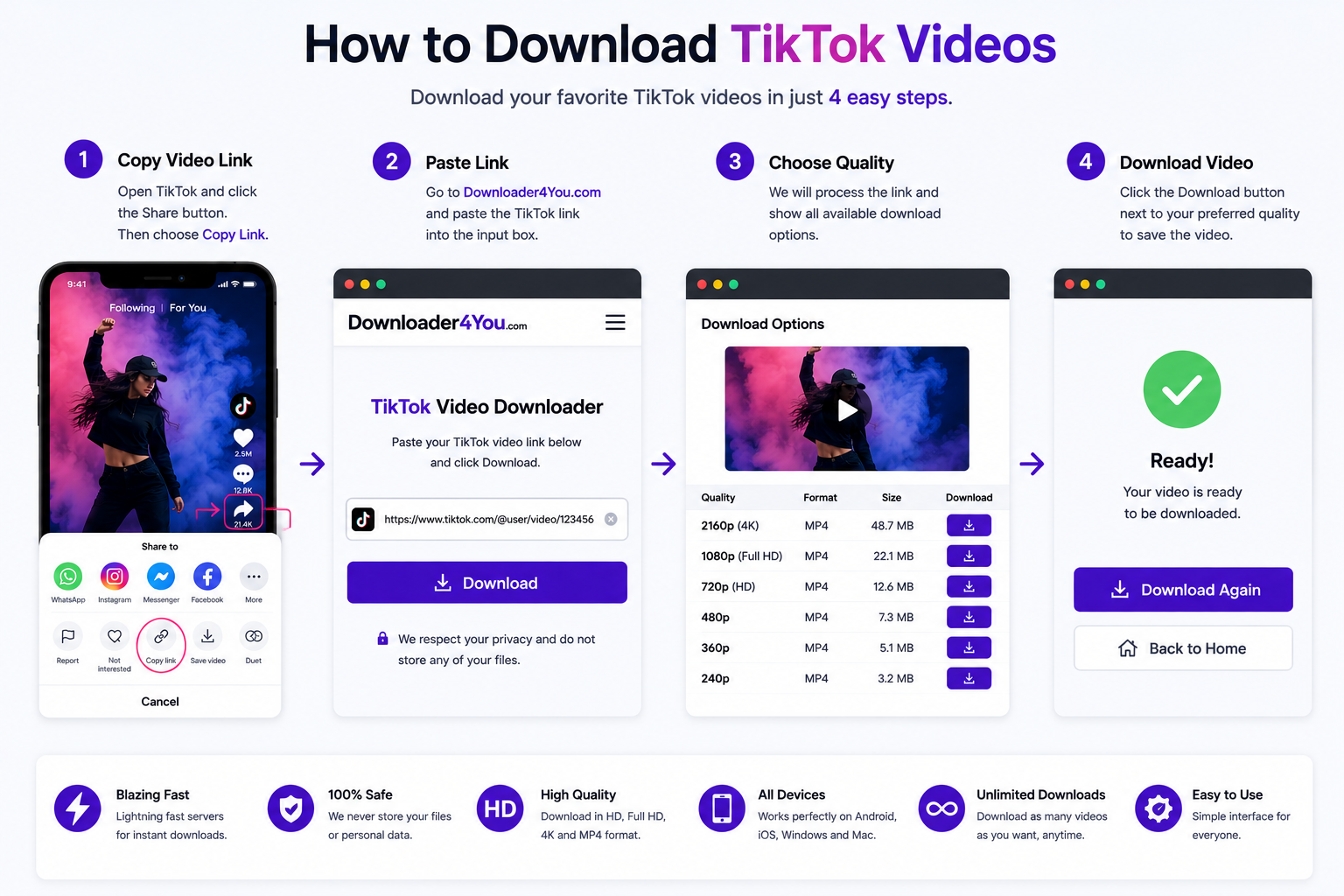
Downloading an authorized TikTok video through Downloader4You follows a simple URL-based process.
1. Copy the TikTok URL
Open the TikTok video and use TikTok’s sharing controls to copy the video link.
2. Open Downloader4You
Go to the TikTok Video Downloader page.
3. Paste the link
Insert the copied URL into the downloader field.
4. Process the URL
Start the processing request.
5. Check available formats
If the URL can be processed, available options may be displayed.
6. Select your preferred option
Choose an available format or quality that suits your needs.
7. Save the video
Save the resulting file using your browser.
The exact appearance of the download process can vary between browsers, operating systems and devices.
TikTok Video Downloader MP4
TikTok Video Downloader MP4 is a popular search query because MP4 is compatible with many devices and media applications.
When an MP4 option is available for a supported video, it can be convenient for users who want a broadly compatible file.
MP4 videos can generally be handled by:
- Windows PCs
- Mac computers
- Android devices
- iPhones
- iPads
- Tablets
- Smart TVs
- Video-editing applications
- Standard media players
The available format depends on the source and the processing options provided.
Downloader4You cannot guarantee that every TikTok URL will produce an MP4 file.
TikTok Downloader MP4
A TikTok Downloader MP4 can be useful for users who want to keep an authorized TikTok video in a common video format.
MP4 is particularly convenient because it is supported by a wide range of modern devices.
However, the file format does not determine your rights to use the content.
For example, downloading an MP4 copy of another creator’s video does not automatically allow you to upload that video to your own TikTok account, YouTube channel, website or social media page.
Always check the applicable copyright and usage rights before reusing downloaded content.
TikTok Downloader HD
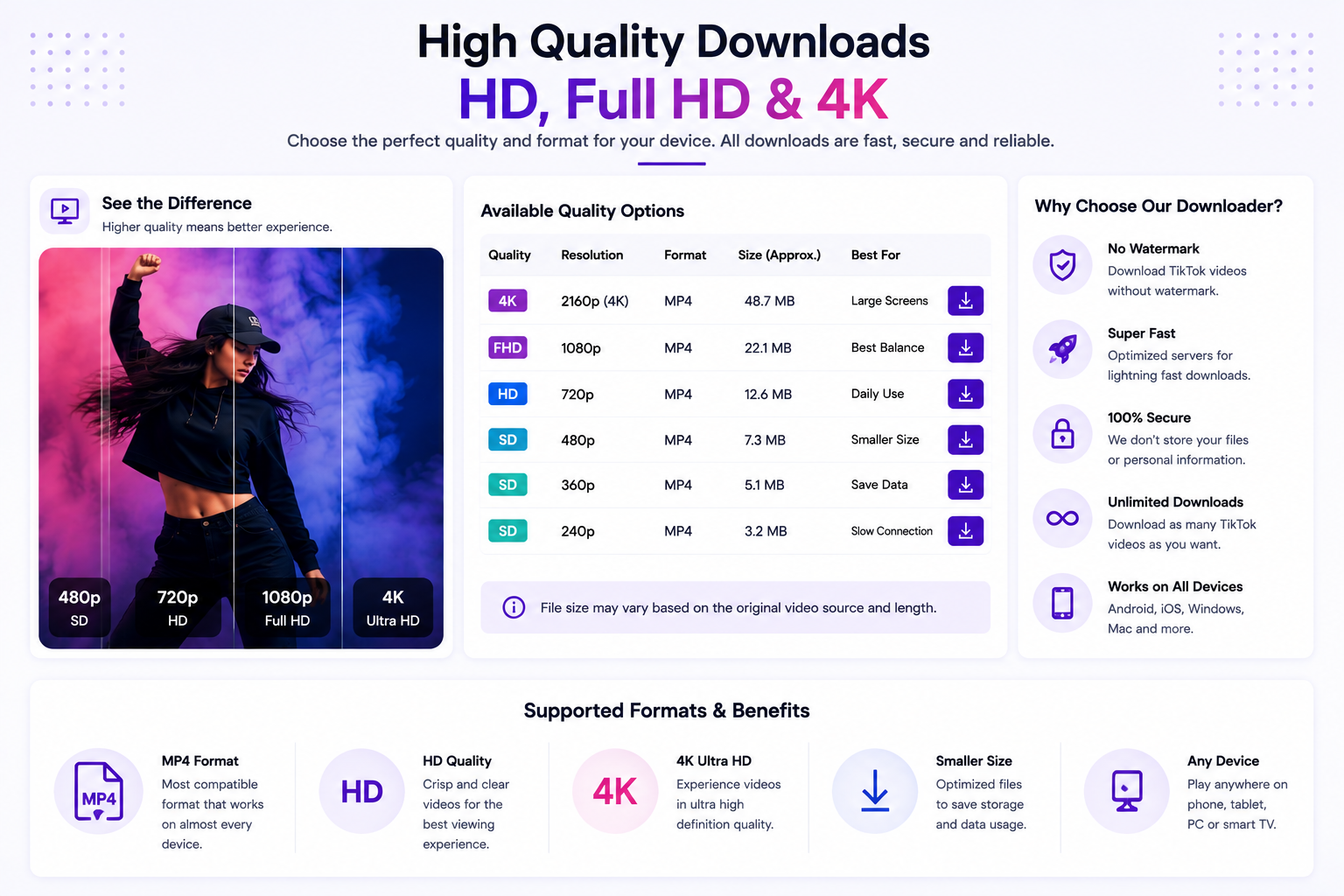
A TikTok Downloader HD is useful when video quality is important.
Depending on the source, available options can include different resolutions.
For example:
| Quality | Suitable for |
|---|---|
| Standard | Smaller files |
| 480p | Basic viewing |
| 720p | HD viewing |
| 1080p | Full HD |
| Higher quality | When provided by the source |
The original TikTok video determines what quality can actually be available.
Selecting a higher resolution usually results in a larger file.
If your phone or computer has limited storage, a smaller available version may be more practical.
TikTok Downloader 4K
Some users specifically search for a TikTok Downloader 4K when they want the highest possible video quality.
However, a downloader cannot turn a low-resolution original video into genuine 4K footage.
If the source does not contain 4K video, a 4K download option cannot recreate the missing detail.
Where a high-resolution version is available and supported, it may appear among the processing options.
Always consider the original resolution rather than relying only on the name of a download option.
TikTok Video Downloader HD
With a TikTok Video Downloader HD, users can check whether higher-quality options are available for their selected video.
HD video can be particularly useful when:
- Keeping a backup of your own content
- Editing your own videos
- Watching videos on larger displays
- Maintaining a high-quality media archive
- Creating authorized offline copies
The quality available depends on the original content.
Downloading a higher-resolution version also means using more storage and potentially more bandwidth.
TikTok Video Downloader 4K
The keyword TikTok Video Downloader 4K represents users specifically interested in high-resolution downloads.
If the source provides a compatible high-quality version, the available result may include a higher-resolution option.
However, not every TikTok video is recorded or published in 4K.
For the best results, choose the highest genuine quality provided by the source rather than expecting a downloader to upscale the original video.
TikTok Video Downloader Without Watermark
Many users search for TikTok Video Downloader Without Watermark.
A watermark can contain platform or creator identification, and its presence depends on how the source content is provided.
Downloading a video does not give the downloader user ownership of the content.
You should not remove creator attribution or copyright information from another person’s work and then present the content as your own.
If you own the video, the best source for a clean version is normally your original video file.
TikTok Video Downloader No Watermark
TikTok Video Downloader No Watermark is closely related to searches for watermark-free TikTok downloads.
If an available source provides a version without a watermark, the resulting file can reflect the characteristics of that source.
However, users remain responsible for respecting the creator’s rights.
A clean-looking video is not automatically copyright-free.
If you plan to publish a downloaded video elsewhere, make sure that you have the necessary permission or legal right to do so.
TikTok Downloader for Android
Downloader4You can be accessed from a compatible Android browser.
You can use your smartphone to copy a TikTok URL and submit it directly to the downloader.
Android steps
Step 1: Open TikTok.
Step 2: Find the video you are authorized to save.
Step 3: Open the sharing options.
Step 4: Copy the video link.
Step 5: Open your Android browser.
Step 6: Visit Downloader4You.
Step 7: Paste the URL.
Step 8: Start processing.
Step 9: Review the available result.
Step 10: Save the file.
The exact download location depends on the Android version and browser being used.
TikTok Downloader iPhone
If you are searching for a TikTok Downloader iPhone, Downloader4You can be accessed through a compatible browser on iPhone.
The basic workflow is similar to desktop:
TikTok → Copy Link → Downloader4You → Paste → Process → Save
The way downloaded files are handled can vary according to your iPhone model, iOS version and browser.
Make sure you have enough free storage before saving larger video files.
TikTok Downloader iOS
The keyword TikTok Downloader iOS is commonly associated with users looking for a browser-based TikTok downloading solution on Apple devices.
Downloader4You does not require you to provide your TikTok password simply to submit a supported URL.
Never give your TikTok, Google or Apple account password to an online downloader.
A URL-processing service should not require your personal account credentials for a normal public video URL.
TikTok Downloader for PC
A TikTok Downloader for PC is useful when you prefer to work with videos on a desktop or laptop.
A larger screen can make it easier to:
- Manage downloaded files
- Organize folders
- Review video quality
- Store larger video collections
- Work with editing software
The basic process remains the same.
Copy the authorized TikTok URL, paste it into Downloader4You and review the available options.
TikTok Downloader Windows
Windows users can use Downloader4You through a compatible browser.
You can access the service from common browsers without requiring a dedicated downloader application.
After saving a file, Windows users can manage it through File Explorer.
The actual filename, extension and download location can depend on the browser settings.
TikTok Downloader Mac
Mac users can also access Downloader4You through a compatible browser.
Mac workflow
- Copy the TikTok video URL.
- Open Downloader4You.
- Paste the URL.
- Start processing.
- Review the available options.
- Save the authorized file.
Afterward, you can manage the file through Finder.
TikTok Video Downloader by Link
A TikTok Video Downloader by Link is useful when you already have the exact URL.
Instead of searching for the video again, you can submit its link directly.
TikTok links can be copied from:
- TikTok’s sharing menu
- Messages
- Emails
- Websites
- Your own profile
- Social media posts
Before submitting a URL, check that it corresponds to the content you intend to process.
TikTok Downloader Link
Searching for a TikTok Downloader Link generally means that you want to use a specific TikTok URL to retrieve an available video file.
The URL-based process is straightforward:
Get the link → Paste the link → Process → Select → Save
If the URL cannot be processed, the source may be unavailable, private, restricted or temporarily unsupported.
Download Your Own TikTok Videos
Creators can use a TikTok Video Downloader as part of their own content backup workflow when their videos are supported.
Keeping local copies of your content can be useful for:
- Backup
- Archiving
- Editing
- Repurposing
- Cross-platform publishing
- Content management
- Business documentation
However, downloading from TikTok should not replace keeping your original recordings.
Your original video files normally provide the greatest flexibility for future editing and publishing.
TikTok Video Downloader for Creators
Creators who publish regularly can benefit from maintaining a structured content archive.
For example, you can organize your own videos into folders for:
- Original recordings
- Published videos
- Edited versions
- Short clips
- Promotional content
- Thumbnails
- Captions
If you download another creator’s video, remember that public availability does not mean the content is free to reuse.
Always respect copyright and creator rights.
TikTok Story Downloader
Some users search for a TikTok Story Downloader when they want to save temporary TikTok content.
Only content that is accessible and supported can potentially be processed.
Downloader4You is not intended to bypass privacy settings or access controls.
If a Story is private or inaccessible, users should not attempt to circumvent those restrictions.
TikTok Story Downloader Without Watermark
The phrase TikTok Story Downloader Without Watermark combines two different requirements: downloading a Story and obtaining a version without visible platform or creator identification.
The availability of a particular version depends on the source.
Regardless of the result, users remain responsible for respecting copyright, privacy and creator rights.
Do not download private Stories or redistribute another person’s content without appropriate authorization.
TikTok Reel Downloader
Searches such as TikTok Reel Downloader and TikTok Reels Downloader can refer to users looking for short-form video downloading tools.
For a TikTok video, submit the TikTok URL to the TikTok downloader.
For content hosted on another supported platform, use the corresponding downloader page.
You can also explore:
- YouTube Video Downloader —
/youtube-video-downloader/ - Facebook Video Downloader —
/facebook-video-downloader/ - Instagram Video Downloader —
/instagram-video-downloader/
This creates a clear internal-link structure between your platform-specific landing pages.
TikTok Thumbnail Downloader
A TikTok Thumbnail Downloader has a different purpose from a video downloader.
A thumbnail is an image associated with a video, while the video itself contains the complete moving content.
If you need a thumbnail from your own TikTok content, keeping your original image file is recommended.
For third-party thumbnails, make sure you have the necessary rights before downloading, editing or publishing them.
Why Is My TikTok Link Not Working?
A submitted URL may not work for several reasons.
The video was deleted
A deleted video may no longer be accessible.
The account is private
Private content may not be available to third-party services.
The URL is incomplete
Check that you copied the complete TikTok URL.
The content has restrictions
Regional or other restrictions can affect accessibility.
The format is unsupported
Not every type of TikTok content is guaranteed to be supported.
TikTok changed its systems
Changes to TikTok’s website or technical infrastructure can temporarily affect third-party compatibility.
Temporary service issue
Occasional technical problems can affect processing.
If the problem continues, contact Downloader4You through the Contact Us page.
Can Downloader4You Download Private TikTok Videos?
No service should be used to bypass legitimate privacy or access controls.
Downloader4You is not intended to circumvent:
- Private accounts
- Private videos
- Authentication
- Login requirements
- Security measures
- Access restrictions
If you do not have legitimate access to content, do not attempt to bypass those restrictions.
Is Downloader4You Safe?
Users should always follow basic online safety practices.
Do not enter your TikTok password into Downloader4You or another third-party downloader.
You should also:
- Keep your browser updated
- Keep your operating system updated
- Check downloaded filenames
- Check file extensions
- Maintain sufficient storage
- Avoid opening suspicious files
- Only download content you are authorized to save
Downloader4You does not claim that every third-party file or external website is safe, so users should exercise appropriate caution with downloaded material.
Is Downloader4You an Official TikTok Downloader?
No.
Downloader4You is an independent website and is not operated by TikTok or ByteDance.
TikTok and related trademarks remain the property of their respective owners.
Downloader4You does not claim to represent TikTok.
For the official TikTok website, visit TikTok.
TikTok Copyright and Downloading
TikTok videos can be protected by copyright.
The rights may belong to the creator, copyright owner, publisher, music rights holder or another authorized party.
Before downloading or using content, make sure you have the appropriate rights.
Examples of potentially authorized content include:
- Videos you created yourself
- Videos for which you received permission
- Content available under an applicable license
- Content that you are otherwise legally authorized to use
Downloading a video does not transfer ownership.
You should not:
- Claim another creator’s video as your own
- Re-upload copyrighted videos without permission
- Sell someone else’s content
- Use downloaded content commercially without appropriate rights
- Remove copyright notices and claim ownership
If you believe your copyrighted material has been improperly processed through Downloader4You, use the site’s Copyright & DMCA / Rights Complaint Policy.
For official platform information, review TikTok’s Terms of Service.
Responsible Use of TikTok Downloader
Downloader4You provides a technical service for processing supported URLs.
The user is responsible for the URLs they submit and for how downloaded material is subsequently used.
The service must not be used for unlawful or unauthorized purposes, including:
- Copyright infringement
- Unauthorized redistribution
- Privacy violations
- Harassment
- Fraud
- Impersonation
- Circumvention of access controls
- Circumvention of security measures
- Distribution of prohibited material
- Other unlawful activity
For additional information, read:
- Privacy Policy
- Terms of Use
- Copyright & DMCA / Rights Complaint Policy
- 18+ / Prohibited Content Policy
- Cookie Policy
- Disclaimer
- Abuse Report
- Contact Us
Frequently Asked Questions
What is a TikTok Video Downloader?
A TikTok Video Downloader is an online service that processes supported TikTok URLs and provides available download options.
How do I download a TikTok video?
Copy an authorized TikTok video URL, paste it into Downloader4You and check the available download options.
Is Downloader4You free?
The basic downloader is available online without requiring a traditional paid subscription.
Can I download TikTok videos as MP4?
An MP4 option may be available depending on the source and technical processing options.
Can I download TikTok videos in HD?
HD options may be available when supported by the original source.
Can I download TikTok videos in 4K?
Only when an appropriate high-resolution source and compatible option are available. Not every TikTok video is 4K.
Can I download TikTok videos without a watermark?
The available result depends on the source. Downloading a video does not give you permission to remove copyright or creator attribution.
Does Downloader4You work on Android?
Yes, you can access the service through a compatible Android browser.
Does it work on iPhone?
Yes, you can access Downloader4You through a compatible iPhone browser.
Can I use Downloader4You on Windows?
Yes. A compatible Windows browser can be used.
Can I use Downloader4You on Mac?
Yes. A compatible Mac browser can access the service.
Can I download my own TikTok videos?
Yes, provided the content is supported and accessible.
Can I download private TikTok videos?
Downloader4You is not designed to bypass private access or security restrictions.
Why isn’t my TikTok link working?
The content may be deleted, private, restricted, unsupported or temporarily inaccessible.
Does downloading give me copyright ownership?
No. Downloading a file does not transfer copyright ownership.
Can I repost a downloaded TikTok video?
Only when you have the necessary rights or permission.
Is Downloader4You affiliated with TikTok?
No. Downloader4You is an independent third-party service.
More Video Downloader Tools
Downloader4You provides separate pages for supported platforms.
You can explore:
YouTube Video Downloader — /youtube-video-downloader/
Facebook Video Downloader — /facebook-video-downloader/
Instagram Video Downloader — /instagram-video-downloader/
X Video Downloader — /x-video-downloader/
Reddit Video Downloader — /reddit-video-downloader/
Pinterest Video Downloader — /pinterest-video-downloader/
Supported Websites — /supported-websites/
These internal links should be added naturally throughout the page where they are contextually relevant.
Start With Your TikTok URL
If you have a TikTok video that you are authorized to save, Downloader4You provides a simple browser-based way to process the link.
Copy the TikTok URL, paste it into the downloader and review the available formats and quality options.
The service is designed for compatible desktop and mobile browsers, giving you flexibility whether you are using a PC, Mac, Android phone, iPhone or tablet.
Paste your TikTok URL to check the available download options.